

Creating an account unlocks personalization, devices, history, alerts, and optional paid features. The signed-in shell keeps property chrome (space switcher, plan, quick links) while pages stay focused: Overview for risk and trends, Live for current readings, Devices / Alerts / History / Share for setup and ops.

Account creation
Registration uses email and password via Supabase Auth. Password reset and (when enabled in Supabase) OAuth providers such as Google, GitHub, or Discord are available from the sign-in page. New users start on the Free plan with a default household.
Getting started checklist
Until you finish essentials (a device or feed, freeze email, and a test alert) — or dismiss the prompt — Overview stays in a calm first-run focus: space status and setup CTAs, without the full Status strip or Insights cards. A short checklist covers device connect, confirming readings on Live, then optional alerts and household invites. When core and optional steps are done, or you dismiss it, the checklist hides; use Show checklist to bring it back.
Overview (Simple vs Insights)
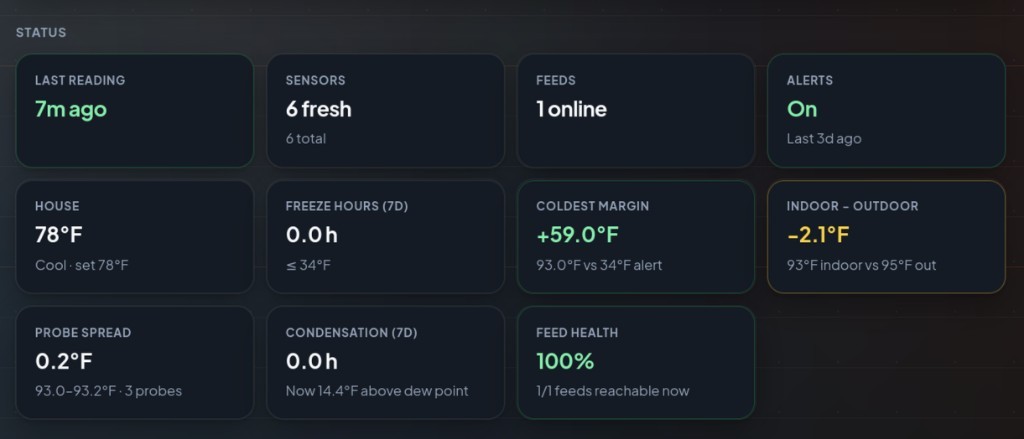
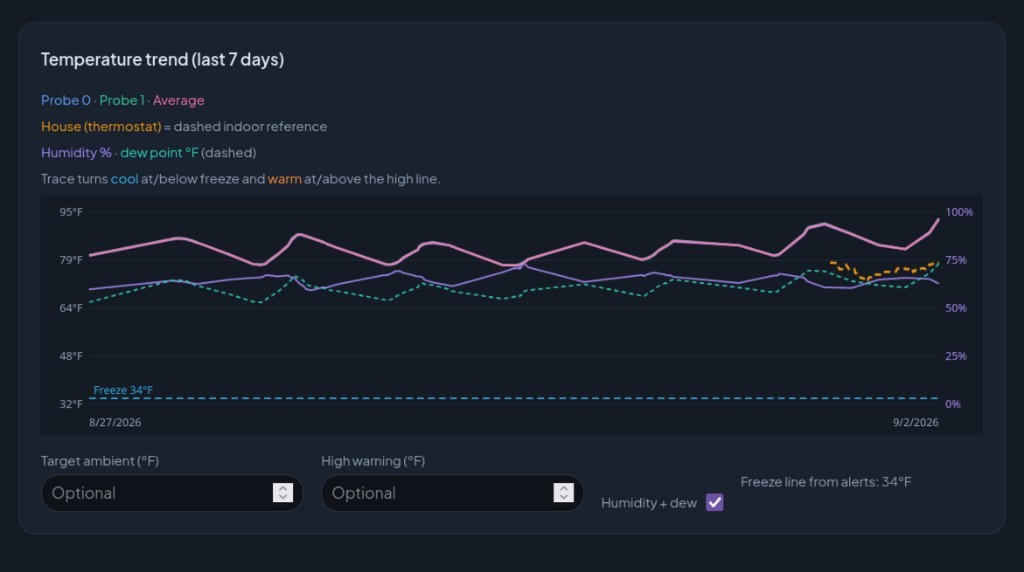
After first-run, Overview opens with garage/space risk status and a Status strip: last reading, sensors, feeds, alerts, freeze hours (with degree-hours), coldest margin above your freeze threshold, indoor−outdoor ΔT, probe spread, condensation hours, and feed health when pull feeds exist. A time-to-freeze clock sits under space status in both Simple and Insights: when this garage, shop, or crawlspace is projected to hit your freeze threshold, using the space's lag vs the outdoor forecast. Toggle Insights for nights-at-risk, week compare, heating insights, door and power correlation, motion, battery/RSSI trends, air quality, energy, and flood/level. The 7-day probe chart (Simple and Insights) can show humidity % and dew point (°F) when readings include RH; the same controls appear on History. Live cards live on Live, not Overview.
Live readings
Live is the signed-in home for current probe cards, outdoor weather when enabled, and offline warnings. Prefer Live after ingest or a pull fetch; use Overview for freeze risk and trends.
Devices & sensors
Under Devices, Setup is for connecting hardware and Status is for health (last seen, battery, RSSI). You can:
- Push devices. ESP/Arduino POSTs JSON to a unique ingest URL. Copy the key from the 30-minute callout; use Reveal ingest key or Rotate key later. Sensors auto-import on first POST; rename labels on Devices afterward.
- Pull feeds: Pull feeds tab: HTTPS JSON URLs we fetch every 15 minutes. Save pull setup auto-imports probe keys; SenML and Home Assistant REST JSON auto-detect when the root is missing.
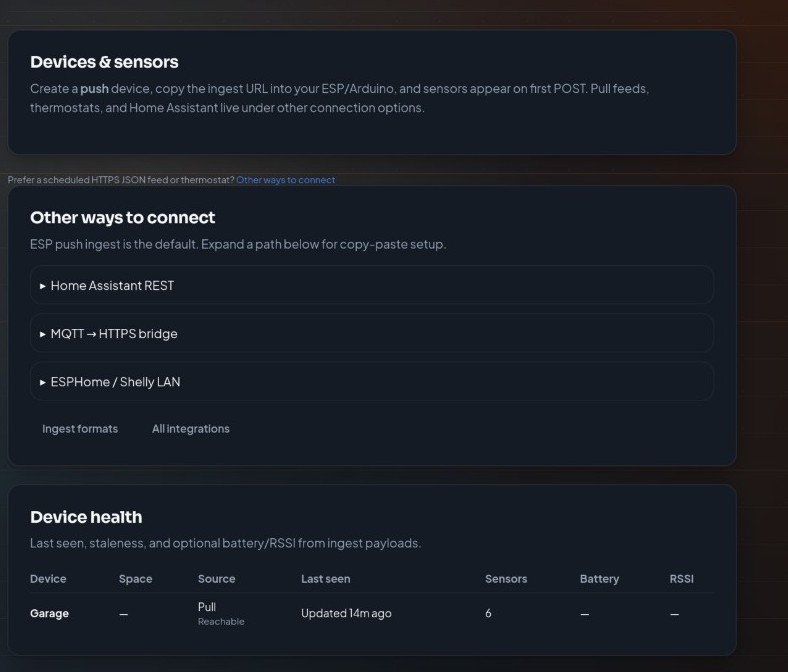
Step-by-step: Adding push and pull devices. After sensors are mapped, verify ingest (or wait for the next pull), then open Live to confirm live values. Payload examples: ingest & webhooks.
Display preferences
Choose whether Live shows probe sensors, outdoor weather, or both. Preferences live in your profile metadata and apply immediately after saving under Settings.
History
Paginated history lists temperature/humidity snapshots for your household. Filter by feed, probe, and date range; clear filters if a query returns no rows. Browsing is included for all signed-in users; CSV download requires Member/Pro (or admin). Background collection runs every **15 minutes** on cron (plus successful push ingests). Refreshing Live can also refresh live cards.
Household activity
Owners and managers see a Recent activity log on Household and Share → Integrations share links, alert saves, device transfers, and ingest key reveals (audited when someone uses Reveal ingest key).
Alerts
Start with Alerts → Essentials (freeze °F + email). After your first ingest POST, Devices can also save essentials inline without leaving the setup flow. Free plans include email, push, and Discord; Pro unlocks SMS and outbound webhooks. Enable a channel only when its destination is filled in: incomplete channels are skipped. Use Send test now to see which channels actually fired.
Households & share links
Invite family by email from Household. Members share devices and history for that household. Every plan includes one family live share link for people without accounts. Pro adds broader share scopes (history/metrics), guest expiries, and revoke anytime.
Plans
- Free, live sensors, devices (limited), history browse, email/Discord alerts, one family live share link.
- Member. CSV export.
- Pro: higher device limits, SMS, outbound webhooks, expanded share scopes, claims evidence pack.
Upgrade from the Plans card on the dashboard or Alerts page.
Admin-only tools
- User manager: review accounts and grant or revoke admin membership.
- Contact submissions: read messages from the public contact form.
- Jobs: operational job visibility when enabled.
Suggested first path
- Create an account.
- One-click Create push device under Devices → Setup (named Workshop probe by default).
- POST a reading: sensors auto-import, then set freeze °F + email on Devices or Essentials and send a test.
- Confirm cards on Live, then Overview space status (Status strip and Insights unlock after essentials).
- Optionally invite household members and share a family live link.
FAQ
What should I configure after creating an account?
Create a push device (Workshop probe by default), POST so sensors auto-import, set freeze °F + email under Alerts → Essentials (or inline on Devices after first ingest), invite household members, and optionally share a free family live link. Start a Pro trial when you need SMS, push, or expanded share scopes.